
Restricted Position Sizing: Why Risk % May Not Change Estimated Loss
When Restricted Position Sizing is on, FX Replay rounds order size to whole contracts, so different risk percentages can show the same estimated loss.
If you change the risk percentage and the estimated loss barely moves, check Restricted Position Sizing first. When it is on, FX Replay sizes the order in whole contracts only, so several risk percentages can land on the same size.
What Restricted Position Sizing does
Restricted position sizing is a toggle in the order panel. You will find it below Units and Entry price.
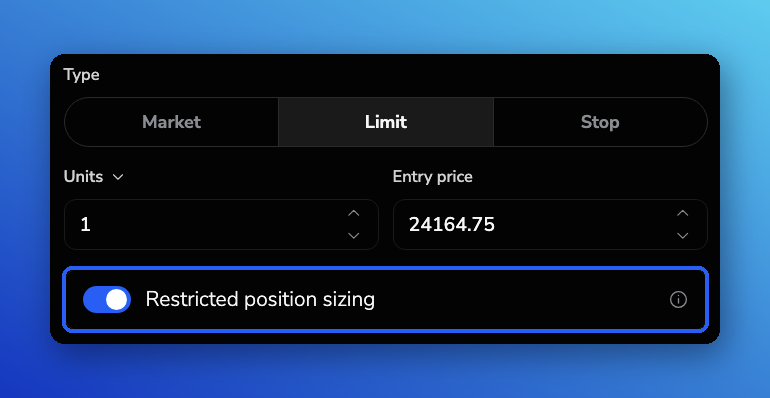
- On: the platform rounds the calculated size up to whole contracts (or whole units for assets that trade that way). Fractional sizes are not used.
- Off: the platform can use fractional sizes so the order can track your selected risk percentage more closely.
Percent risk still starts from your account size, stop distance, and the asset's value per point. The toggle only controls whether that calculated size is forced to a whole contract.
Why different risk percentages can show the same estimated loss
Estimated loss is based on the size that will actually be placed, not only on the risk percentage you typed.
When Restricted Position Sizing is on and the risk-based size is below one full contract, the platform rounds up to 1 contract. Every risk percentage that still rounds to that same 1 contract will show the same estimated loss.
Example on NQ
On NQ, each full contract is worth $20 per point. With a stop loss about 53.75 points from entry, one full contract risks about $1,075.
On a $50,000 account:
| Risk selected | Intended risk (before rounding) | What happens with Restricted Position Sizing on |
|---|---|---|
| 0.5% | about $250 | Size is below 1 contract, so it rounds up to 1. Estimated loss stays about $1,075. |
| 1% | about $500 | Still below 1 contract for that stop, so it can still round to 1. Estimated loss can stay about $1,075. |
| 2% | about $1,000 | Still can round to 1 for that stop. Estimated loss can stay about $1,075. |
With Restricted Position Sizing off on NQ1 in the same kind of setup, 0.5% risk sized about 0.23 contracts and showed about $247.25 estimated loss, which matches the selected percentage much more closely.
This is expected when whole contracts are required. Your stop loss must still be set for estimated loss to calculate correctly.
What to try
1. Turn Restricted Position Sizing off (first check)
- Open the order panel in your backtesting session.
- Find Restricted position sizing below Units and Entry price.
- Turn it off.
- Set your risk percentage again and check units and estimated loss.
Use this when you want fractional contracts so percent risk can land closer to the amount you chose.
2. Use a micro contract when you want whole contracts at smaller risk
If you prefer whole contracts, switch to the micro version of the market when it is available. For Nasdaq-style practice, MNQ is the micro contract (worth $2 per point, versus $20 per point on NQ). The same stop distance risks less dollars per contract, so whole-contract sizing can fit smaller account risk targets.
3. Recheck stop loss and account size
Percent risk needs a stop distance and your session account size. If stop loss is off, misplaced, or the account size is not what you expect, estimated loss will not match the percentage you selected. For placing the stop with the order, see How to Place Trades: Market, Limit & Stop Orders and How to Set Stop Loss, Take Profit & Partial Profits.
Related settings
- To save a usual percent risk, stop loss and take profit for one-click orders on the New Chart, see How to Use Order Presets for Faster Trade Execution.
- Restricted Position Sizing is an order-panel toggle. It is separate from Advanced Session settings such as margin, leverage, hedging and slippage.
Frequently Asked Questions
I changed risk from 0.5% to 2% and estimated loss did not change. Is risk broken?
Not necessarily. Check Restricted Position Sizing first. If it is on and every percentage still rounds to the same whole contract, estimated loss stays the same.
Where is Restricted Position Sizing?
In the order panel, below Units and Entry price.
Should I leave Restricted Position Sizing on?
Leave it on when you want whole contracts only. Turn it off when you want fractional sizes so percent risk can track more closely. For smaller whole-contract risk on index futures, consider the micro contract (for example MNQ instead of NQ).
Does this only affect NQ?
The same rounding applies wherever Restricted Position Sizing is on and the asset is sized in whole contracts. Full-size futures with wide stops are where it shows up most often, because one contract can already exceed a small percent of the account.
My order will not place at all. Is that this setting?
Restricted Position Sizing changes size and estimated loss. If the order will not place or shows a validation error, see Why Isn't My Trade Being Placed?.
Related articles
Keep exploring this topic.